Support
Email us with any support questions. We will get back to you in a few days.
support@greenbooks.appr/greenbooks
Join our new subreddit. It’s brand new, so say hi to everyone there.
Open the subredditCheck the video tour first
There’s a video for every part of GreenBooks — 10 of them, one per topic. Most questions we get are answered in one of them, so it’s worth a look before you email.
Have an idea for GreenBooks?
Post it on the feature request board, or vote for one that’s already there.
Common questions
On a Mac, I get a permission error when I add GreenBooks to my Dock
If you try to add GreenBooks to your Dock and Safari tells you this:
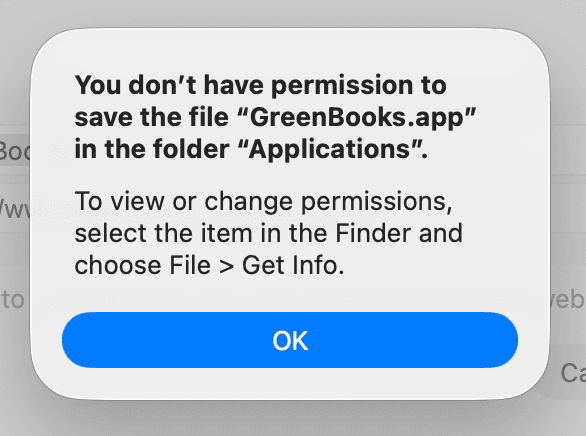
…then it’s a folder on your Mac that’s set up wrong, and we have a small program that puts it right for you.
Download it, double-click it, and click Fix It. It takes a second, it won’t ask you for a password, and it doesn’t delete anything. Then go back to Safari and choose File › Add to Dock again — it will work this time.
It leaves an Applications (old) folder in your home folder. Everything that was in it has been copied across, so you can drag it to the Trash whenever you like.
How do I add GreenBooks to my Dock or home screen?
Mac (Safari): open GreenBooks, then choose File › Add to Dock from the menu bar and click Add.
Mac or Windows (Chrome, Edge): click the install icon at the right-hand end of the address bar, then click Install.
iPhone or iPad: tap Share, then Add to Home Screen, then Add. Android: tap the ⋮ menu, then Add to Home screen or Install app.
It opens in its own window afterwards, without the browser bar around it. There’s a video for this too, under Mobile App in the tour.